ezVSP History


  • 2007/07/25 [v2.2f]
  • : bug fixed that is related Telnet COM port control option.
  • 2007/03/09 [v2.2e]
  • : bug fixed that is related to prevent a duplicated running.
  • 2006/12/28 [v2.2c]
  • : You can use a domain name for TCP client and UDP.
  • 2006/09/21 [v2.2a]
  • : Improve Keep Alive function.
  • 2006/06/27 [v2.1j]
  • : Init ezVSP shortcut path fix.
      enlarge ezVSP buffer size from 8K bytes to 64K bytes.
  • 2005/12/14 [v2.1g]
  • : The process of RTS signal is enhanced.
      prevent running ezVSP more than one.
      ezVSP moved window tray when it runs the first time.
  • 2005/11/08 [v2.1d]
  • : Program termination problem when use duplicate listening port under SSL server mode is fixed.
      Support flow-control.
  • 2005/11/07 [v2.1c]
  • : Program termination problem when re-try TCP/IP connection is fixed.
  • 2005/08/24 [v2.1a]
  • : In TCP client mode, a TCP/IP connection is started to peer host when a VSP is started.
      In UDP mode, SSL option is disabled.
      VSP control is automatically initialized.
  • 2005/06/23 [v2.0j]
  • : Correct ezVSP install file.
      Because SSL communication does not work when you start ezVSP using shortcut.
  • 2005/06/13 [v2.0i]
  • : New ezVSP version 2.x released.


    ezVSP Features


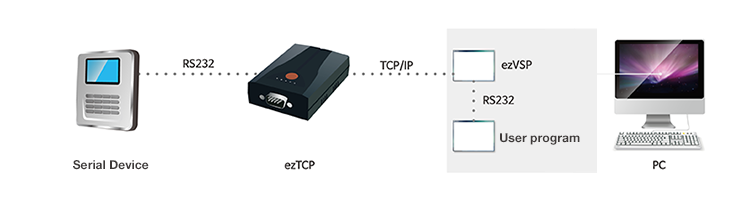
  • ezVSP, which is a program playing the same role as ezTCP/LAN in PC, provides data communication between serial port and Ethernet (TCP/IP). With the help of ezVSP you can exchange data between Ethernet and your serial port without modifying standard communication programs on your PC.

  • The ezVSP program is provided for user who uses ezTCP/LAN and you should enter the key value when you run the ezVSP program for the first time. You can get a key from Sollae Systems homepage at
    http://www.eztcp.com/en/Support/req_reg.php

  • If you have many ezTCP/LAN, it is enough to register only one.

  • ezVSP is designed for Windows 2000/XP.

  • ezVSP supports TCP server(does not support multiple connections), TCP client and UDP.

  • ezVSP supports SSL v3.0 and TLS v1.0.

  • With ezVSP you can create as many virtual serial ports as needed.

  • ezVSP program is subject to change without prior notice. The latest version is [ezVSP v2.2h].


  •  

    ezVSP System Diagram


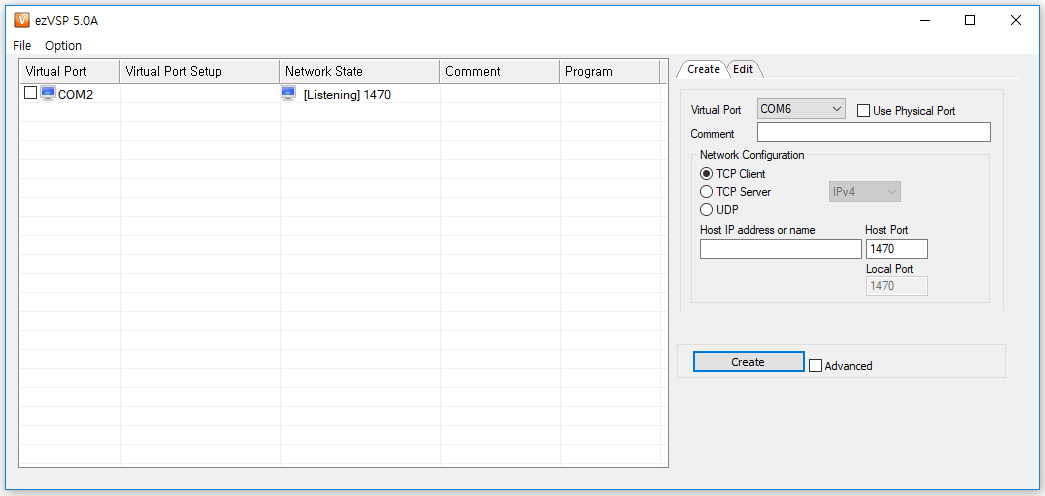
    ezVSP Functions


    Create environment variables to run virtual serial ports.

    Select a virtual serial port for which you want to change settings in the main window and click button.

    Select a virtual serial port you want to delete in the Main window and click button to delete the selected port.

    To start a port, select the check box next to it in the Main window and click button to start all selected ports.

    Select the check box next to virtual serial ports you want to stop in the Main Window and click button to stop all the selected ports.

    Select check boxes next to virtual serial ports you want to delete in the Main window and click button to delete all the selected ports.